


myEquifax
4.6991.00 Reviews
App Specs
- Version
- 1.11.0
- Updated On
- License
- Free
- Downloads
- 500,000+
- Developer
- Equifax Incorporated
- Categories
- Finance
- Platform
- Android
Screenshots
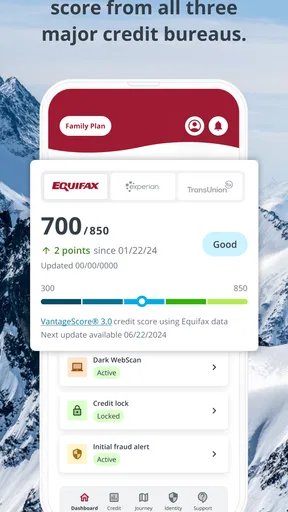
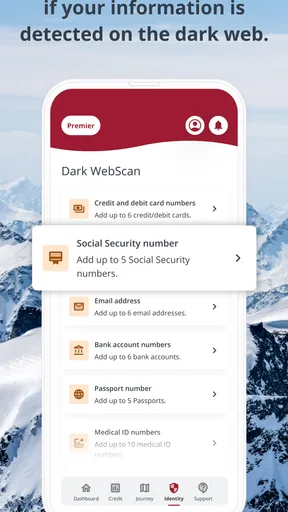

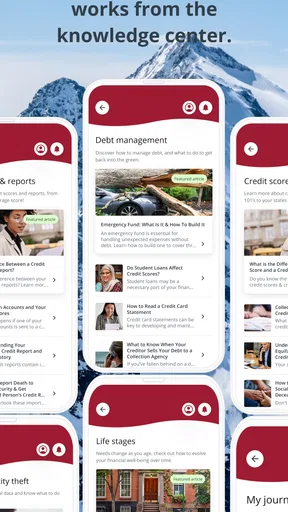
 Analysis by AppCompare
I treat myEquifax as a focused place to check credit information, not as a complete personal-finance command center. That distinction matters: its value is clearest when I want to understand what is happening in my Equifax credit file and build a steady habit around reviewing it. If I were choosing an app to budget, track spending across accounts, or plan investments, I would look elsewhere. For a simple credit-checking routine, though, it has a useful, direct purpose.
A practical routine for checking your credit
My preferred approach is to open the app with a specific question in mind rather than browse without a reason. I might want to see whether a report change needs attention, understand what is influencing my score, or simply keep an eye on my credit picture. A short, repeatable check makes the information easier to act on than an occasional deep dive after something has already caused concern.
For example, imagine I have just applied for a new account and want to stay alert to changes in my credit file. I can make a note to review the app during my next regular finance check-in, look for anything unfamiliar, and follow up through the appropriate channel if a report detail needs investigating. The useful habit is not refreshing constantly; it is knowing when I last checked and giving myself time to respond if something looks wrong.
Build a habit around the information
I find it helpful to pair a credit review with another monthly money task, such as checking bills or organizing receipts. That creates a natural reminder without relying on frequent notifications. When I do open the report, I would focus on changes and unfamiliar details first, then read the score information in context. A number on its own is less useful than understanding what may be affecting it and whether there is a practical next step.
One trade-off is that a credit report is only one view of financial health. It does not replace a budget, a spending history, or a broader review of debts and savings. I would use myEquifax alongside those tools if I needed a full picture, while avoiding the temptation to treat every score movement as an emergency. The app is most useful when it prompts careful attention, not anxiety or impulsive decisions.
Who will get the most from it
This is a sensible choice for someone starting to learn how credit reporting works, or for anyone who wants a straightforward way to check their Equifax information without turning the task into a research project. It may also suit people who prefer one focused app rather than a general finance dashboard full of spending categories and account summaries. Equifax Incorporated is the developer, and the app’s narrow focus is part of its appeal for that audience.
I would be less likely to recommend it as a person’s only money app. If you want to compare credit information from multiple reporting sources, see all your accounts in one place, or manage a household budget, a broader finance service may fit better. Those tools answer different questions, so the best choice depends on whether the priority is credit-file awareness or day-to-day money management.
Worth Reading Before You Choose

EA SPORTS FC Mobile 26 Is a Bigger Football Game, but It Takes Time

Flipboard Shows What News Apps Must Do Beyond the Feed

Switching to Android Auto Means Rethinking Your Driving Routine

Google Calendar Makes a Crowded Week Easier to Manage

Ludo King Makes the Most of the Minutes Between Plans

Baby Panda World Brings Quick Play to Modern Phones, but Its Game Library Feels Busy
Details to check before relying on it
Because this app deals with sensitive financial information, I would take care during setup: use account credentials you can keep secure, avoid signing in on a device you do not trust, and take time to understand the account and privacy choices presented in the app. I would also keep my contact details current where the account asks for them, since useful account notices are only helpful when they can reach me. These are sensible habits for any financial app, not a reason to assume a particular setting or protection is available.
It is also worth remembering that an alert is a prompt to investigate, not a full explanation of what happened. If a notice appears, I would open the relevant report details, check whether I recognize the activity, and use the appropriate support or reporting route if I do not. That measured sequence is more useful than reacting to a notification alone. The app can help me notice a possible issue, but it cannot make the decision about what that issue means.
Where a focused app has limits
A credit-focused tool naturally leaves other financial questions unanswered. I would not expect it to tell me whether a monthly purchase is affordable, whether I am saving enough, or which borrowing option is best for my circumstances. Those decisions call for a budget and, at times, independent advice. Keeping those boundaries clear prevents a convenient credit check from being mistaken for a complete financial plan.
There is another practical limitation: credit information can be personal, and reviewing it may involve identity details and a little setup effort. If I only need a one-time answer, I might prefer the relevant official service or a browser-based account rather than installing another app. If I expect to check regularly, having a dedicated place on my phone is more convenient. I would decide based on the habit I actually intend to keep, rather than download it just because monitoring sounds responsible.
The app is free, rated for Everyone, and its current version is 1.8.1, with Android 8.0 as the minimum operating system requirement. Its average rating is 4.6 from around 7,200 ratings, and it has over 100,000 installs. Those figures suggest a substantial audience, but they do not tell me whether its approach will suit my own needs; the important question is whether I want a focused Equifax credit-checking routine.
As an app in the finance category, it has a clear role. I would use it as one part of a broader routine: check the report, note anything that needs follow-up, and handle budgeting or account-wide planning elsewhere. That division of labor is a strength if I value focus, and a drawback if I expect one download to manage every part of my finances.
Its release date is April 25, 2025, and the store description is simply myEquifax. Neither detail changes how I would judge it in daily use: I care more about whether I can find the information I need, understand it, and respond sensibly. The app is best treated as a convenient access point for credit awareness, not as a substitute for learning how reports work or checking important details carefully.
For a new user, I would start by signing in when I have enough time to complete setup thoughtfully, then make one calm pass through the available report and score information. After that, I would choose a realistic check-in rhythm and avoid turning normal changes into a reason to obsess over the app. If I am looking for credit awareness and can use an Equifax-focused service, that is a practical starting point. If I want budgeting, broader reporting comparisons, or a one-off check, I would choose a tool designed for that job instead.
Getting Started with myEquifax
Alright, first things first, let’s talk about setting up myEquifax. The app is available on both Android and iOS, so no one's left out here. Installation is a breeze, and within minutes, you’re ready to go. The initial setup requires you to create an account or log in with your existing Equifax credentials. Once you’re in, the app greets you with a clean and intuitive interface that's easy on the eyes.
Navigating the Features
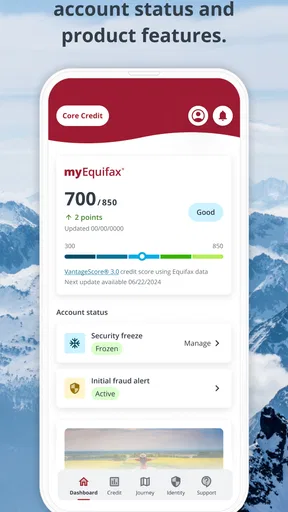
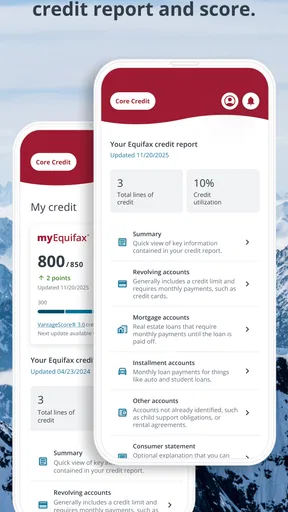
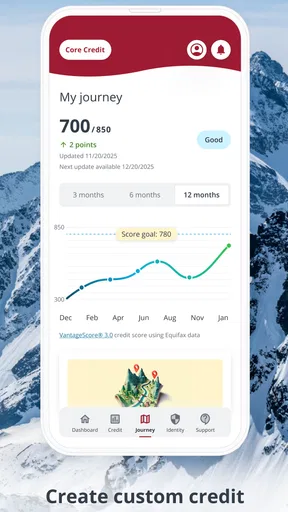
One of the standout features of myEquifax is the quick access to your credit report. With just a few taps, you can view your credit score and understand what’s affecting it. The app breaks down complex information into digestible bits, which is fantastic if you're not a finance whiz.
Another cool feature is the alerts system. You'll get notifications about significant changes to your credit report. This way, you can catch any suspicious activity early. Trust me, this can be a lifesaver!
Security and Privacy
Now, I know what you’re thinking – "Is my data safe?" Well, myEquifax takes security seriously. The app uses encryption and other security measures to keep your information protected. It's like having a little fortress around your credit data.
User Experience
Let’s talk about usability. The app runs smoothly, and I didn’t experience any crashes or lagging, which is always a plus. The design is straightforward, making it easy to navigate through different sections without getting lost. For those not so tech-savvy, there are helpful tips and FAQs sprinkled throughout the app.
The customer support is pretty responsive too. If you hit a snag, there are multiple ways to get in touch with the support team, and they’re generally quick to respond. It's reassuring to know help is just a message away.
What Could Be Better?
No app is perfect, right? While myEquifax is pretty solid, it does have a couple of areas for improvement. For instance, some users might find the initial information input a bit tedious. Also, while the app covers the basics well, it could benefit from more advanced tools for those who want to dive deeper into their financial analysis.
Another point to note is that while the app is free, there are some premium features that require a subscription. It’s not a deal-breaker, but something to keep in mind if you’re looking to access everything the app offers.
The Final Word
So, is myEquifax worth downloading? I’d say yes, especially if you want a simple and effective way to keep track of your credit score. It’s user-friendly, secure, and gives you peace of mind with real-time alerts. Whether you’re looking to improve your financial standing or just stay on top of your credit health, this app is a handy tool to have in your pocket.
Give it a shot and see how it fits into your financial routine. Who knows? You might just find yourself geeking out over credit scores like never before!
Pros
- User-friendly interface
- easy navigation.
- Free credit report access monthly.
- Real-time credit alerts available.
- Secure login and data protection.
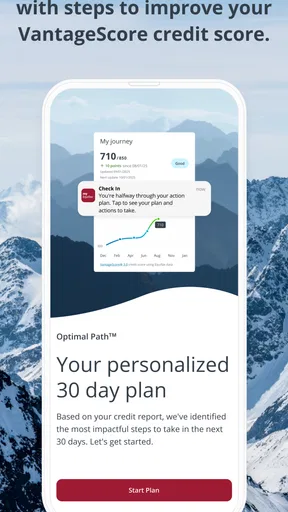
- Educational resources for credit improvement.
Cons
- Limited features in free version.
- Occasional slow response times.
- Push notifications can be excessive.
- Requires personal information for setup.
- No in-app customer support chat.
FAQs for myEquifax
What is myEquifax and how does it work?
myEquifax is a free online service that provides users with access to their Equifax credit report. The platform allows you to manage your credit profile, dispute inaccuracies, and receive alerts about any changes. It's designed to help you stay informed and in control of your credit health.
Is myEquifax safe to use?
Yes, myEquifax is designed with security in mind. It uses encryption and other security measures to protect your personal information. Always ensure that you access your account through the official website and avoid sharing your login details to maintain security.
Can I access my credit score through myEquifax?
While myEquifax provides access to your credit report, it does not include your credit score for free. However, you may have options to purchase your credit score or access it through other Equifax services or promotions that may be available.
How often can I check my credit report on myEquifax?
With myEquifax, you can access your Equifax credit report for free once a year. Additionally, you have the option to pay for more frequent access if needed. It's a helpful tool for tracking your credit health and ensuring accuracy in your credit information.
What should I do if I find an error on my credit report?
If you spot an error in your credit report, myEquifax provides a straightforward dispute process. You can submit a dispute directly through the platform. Equifax will then investigate the issue and update your report as necessary, keeping you informed every step of the way.


